
MyFuneralManager
  • Features
  • Following Code
  • Pricing
  • About Us
  • News
  • FAQ
  • Contact Us
BOOK A DEMO

Getting Started

2
  • Welcome to MyFuneralManager
  • Logging In

MyFuneralManager

6
  • The Dashboard
  • Adding a New Funeral Record
  • Calendar
  • Fixed Data Files
  • Branch Chat
  • Coroners Invoice

Information

2
  • QR Codes
  • The Bereavement Register

HELP!

1
  • I have forgot my password
View Categories
  • Knowledge Base
  • MyFuneralManager
  • Fixed Data Files

Fixed Data Files

< 1 min read

The Fixed Data files are where all of your extra funeral data is stored, this is usualy data that you can select from, ie, Hospital's, Nursing Homes or coffin details, they are all stored in the fixed data files. 

If you are completing a New Funeral record and find that a hospital address is not in the system, add a Funeral date you need this to be able to go back to the record. 

Go to the Fixed Data files and click the item you need,

  • \
    Contacts File/Address Book
  • \
    Urns and Ashes Caskets
  • \
    Car Choices
  • \
    Coffin/Casket Files
  • \
    Gown Selection
  • \
    Fittings and Linings
  • \
    Staff file
  • \
    Flowers
  • \
    Own Charges
  • \
    Payment Methods
  • \
    Cem/Cremation Fee's

Add a new item or edit the item, if it is an address please select the type of address,
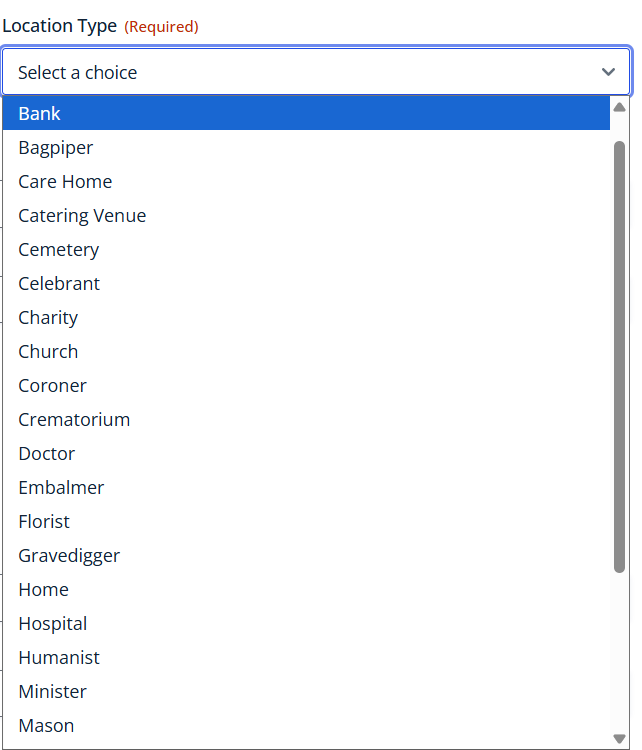
 

Complete the new address and click Submit


You Can now go back to the main dash board and Edit the Funeral Record and add the missing address/minister etc.

Updated on 11 May 2026

Did this tutorial help you?

  • Happy
  • Normal
  • Sad

MyFuneral manager

Features Following Code Pricing Current Version V1.1.16.05.2026

Information

Terms & Conditions Cookies Policy Data Protection Policy Privacy Policy

Support

Log a Support Ticket ]Uptime Status pKnowledge-base tFAQ

Copyright © 2026 MyFuneralManager